OpenClaw AI
OpenClaw ,包括 OpenCode 等都是是开源社区针对官方 Claude Code 打造的全能型、无限制开源替代方案。
核心架构:三位一体
OpenClaw 的运行由三个核心部分驱动:
- 配置文件 (Config) :定义 身体 ——连接哪些模型、通过什么频道通话、开放哪些端口。
- 工作区 (Workspace) :定义 心智 ——我是谁、我的性格、我记住了什么、我要做什么。
- 主动任务 (Heartbeat/Cron) :定义 意识 ——在没人找我时,我该主动检查什么。
OpenClaw 安装部署
- OpenClaw v2026.3.8
- Node.js v22.22.1
OpenClaw 依赖 Node.js 22 或更高版本。可以参考以下命令安装 Node.js
curl -o- https://raw.githubusercontent.com/nvm-sh/nvm/v0.39.7/install.sh | bash |
安装 OpenClaw,以下两种方式任选其一即可,也可用于升级。
curl -fsSL https://openclaw.ai/install.sh | bash |
初始化与配置 ,安装完成后,你需要运行 onboard 向导来配置 API Key(如 Anthropic, OpenAI 或本地的 Ollama)以及通信渠道。
openclaw onboard --install-daemon |
配置渠道(以 Telegram 为例)
openclaw channels login telegram |
查看 OpenClaw 安装的 Skills
openclaw skills list |
安装完成后,其配置和常用文件位于 ~/.openclaw/
tree .openclaw/ |
完全卸载 OpenClaw
如果要卸载已安装的 OpenClaw 及其配置,参考以下命令,用 OpenClaw 自带卸载,可以先执行命令 openclaw uninstall --all --dry-run 确认将删除哪些内容。确认无误后执行完全卸载(含服务/状态/工作区/应用数据)
openclaw uninstall --all --dry-run |
执行 openclaw uninstall --all 后,知识删除了服务( /root/.config/systemd/user/openclaw-gateway.service )和 OpenClaw 配置目录 ~/.openclaw ,要卸载 openclaw 程序,需要使用 npm 命令
npm -g remove openclaw |
OpenClaw 配置文件详解
主配置文件
.openclaw/openclaw.json 是 OpenClaw 的主配置文件,是 OpenClaw 的 神经中枢,决定了它如何与世界交互 。示例配置文件:
{ |
模型提供商 (
auth & agents)- 在
auth模块中,默认使用了openrouter:default。 - 核心模型被设定为
openai/gpt-5.4
- 在
通信频道 (
channels)- Telegram : 目前已启用。通过
botToken连接,并设置了groupPolicy: allowlist,这意味着它只会在白名单群组中响应。"dmPolicy": "pairing",表示只有已经“配对(Pairing Approve)”的用户,才能通过私聊使用 OpenClaw
- Telegram : 目前已启用。通过
网关服务 (
gateway)
Models 相关配置文件
AI 如何思考取决于模型(Models)配置和它所拥有的工具 。
OpenClaw 的模型系统由三个文件协同工作:
openclaw.json: 决策层 。- 在
agents配置段中,指定了默认使用哪个 Model - 在
auth配置段中,配置了默认使用哪个 Auth Profile ,以及 Provider 。
- 在
agents/main/agent/auth-profiles.json: 凭证库 。- 定义了如何连接到提供商(Provider)和具体的 Auth Profile 信息。例如
openrouter:default配置了api_key模式,并存储了实际的 Key。
- 定义了如何连接到提供商(Provider)和具体的 Auth Profile 信息。例如
agents/main/agent/models.json: 能力库 。- 列出了每个 Provider 下可用的具体模型及其参数(如上下文窗口、是否支持推理、支持的输入类型等)。
要注意这里 主要用于定义“自定义提供商”(如 OpenRouter、本地 Ollama)或者覆盖内置参数 ,类似
google/gemini-3.1-flash-lite-preview等模型是 OpenClaw 官方原生支持的模型。系统内核已经知道了它的上下文窗口(1024k)、输入能力(text+image)等参数。只要在openclaw.json或auth-profiles.json中找到了对应的 API Key,系统就能直接调用,无需在models.json中额外声明。
- 列出了每个 Provider 下可用的具体模型及其参数(如上下文窗口、是否支持推理、支持的输入类型等)。
OpenClaw 在寻找模型参数时遵循以下顺序 :
models.json(手动覆盖层) :如果您在这里写了,优先级最高。- 内置定义层 :系统自带的主流模型参数。
- 动态拉取层 :通过 API 向提供商实时查询。
Models 关联逻辑流程图 :
openclaw.json (我要用 gpt-5.4) -> models.json (查到 gpt-5.4 属于 openrouter) -> auth-profiles.json (拿到 openrouter 的 API Key) -> 发起请求 。
混合策略: openclaw.json 中的 agents 支持多用途模型(为模型赋予不同的角色),你可以为不同的 Agent 设置不同的 Profile。例如:
客服 Agent 使用便宜的 GPT-3.5。
专家 Agent 使用昂贵的 Claude-3-Opus。
openclaw.json "auth": {
"profiles": {
"openrouter:default": {
"provider": "openrouter",
"mode": "api_key"
}
}
},
"agents": {
// 不再使用 "defaults",而是为每个 agent 单独定义
"main": { // 这是默认的“专家” Agent
"model": {
"primary": "openai/gpt-5.4",
// 可以在这里为专家 agent 指定一个推理模型
"reasoning": "openrouter/hunter-alpha"
}
},
"support": { // 这是新的“客服” Agent
"model": {
"primary": "openai/gpt-3.5-turbo"
}
}
},不同的 Agent 使用路由绑定机制路由到不同的 Agent。
agents/main/agent/auth-profiles.json 存储了连接到这些模型提供商所需的 API 密钥。这是它的“身份凭证”。
{ |
agents/main/agent/models.json 文件定义了可用的 AI 模型,以及 模型能力参数 。可以看到,这里配置了多个模型,例如 openrouter/hunter-alpha 和 openrouter/healer-alpha 。它们被标记了 reasoning: true ,这暗示 OpenClaw 内部可能会根据任务的复杂性,选择不同的“大脑”来进行思考。例如,简单的聊天使用一个模型,而复杂的代码分析则调用另一个更强大的“推理”模型。
不要手动修改
models.json,这个文件是由系统自动维护,手动修改会被自动还原
agents/main/agent/models.json 允许配置多个 Provider(如 OpenAI, Anthropic, Local LLM 等)。
{ |
- 本地模型 : 你可以添加一个
baseUrl指向localhost的 Provider(如 Ollama),实现 100% 本地运行。
如何教系统使用新模型
修改配置推荐使用 openclaw onboard 命令,添加新模型和 API Key 后,系统会完成以下工作:
- 在
auth-profiles.json添加 API Key。 - 在
models.json定义该 Key 对应的模型列表和能力。 - 在
openclaw.json指定在什么情况下使用这个新模型。
最好不要手动修改这些配置,而是使用系统提供的 CLI 命令,或者通过 Web UI 修改。
Workspace 相关配置文件
OpenClaw 的核心设计哲学是 无状态执行,有状态存储 。这意味着 AI 本身在每次会话开始时都是一张白纸,它的所有记忆和个性都来自于对 workspace/ 目录下的 Markdown 文件的实时读取。
- SOUL.md : 核心价值观 。规定了它应该“真诚”而非“客套”,要有自己的观点,而不是复读机。
- IDENTITY.md : 身份设定 。包括它的名字、物种(AI 或其他)、口吻和标志性 Emoji。
- USER.md : 关于你 。记录你的偏好、时区、正在进行的项目以及你的笑点。
- MEMORY.md : 长期记忆 。存储经过经过提炼和归纳的核心记忆,AI 会在心跳(Heartbeat)或空闲时主动进行“记忆维护”,将短期日志中的重要信息沉淀到
MEMORY.md中,这个过程类似于人类大脑在睡眠时巩固记忆。 - memory/YYYY-MM-DD.md : 短期记忆。这是未经处理的原始日志,就像人的日记,记录了每天发生的琐事。
- HEARTBEAT.md : 主动性。这是 OpenClaw 区别于普通 AI 的关键。即使你没说话,它也会定期醒来执行
HEARTBEAT.md中的任务。- 心跳机制 : 它会检查邮件、日历、天气或你布置的定期检查任务。
- 回复 HEARTBEAT_OK : 如果检查后发现一切正常且无需打扰你,它会保持沉默,只返回一个状态码,节省你的注意力和 API 成本。
- BOOTSTRAP.md : 初始化。
- 第一次启动时,按照
BOOTSTRAP.md的引导,通过对话确定它的名字和性格。 - 手动或让它自动填写
IDENTITY.md和USER.md。
- 第一次启动时,按照
每次会话开始,它的首要任务是:
- 读取 SOUL.md :加载核心行为准则。
- 读取 USER.md :了解交互对象(您)的偏好。
- 加载 memory/ 目录下的日志,获取上下文 :读取近期记忆
定时任务 ( cron/jobs.json ):高精度、独立的任务
心跳( HEARTBEAT.md ),它适合执行那些 不需要精确时间、可以批量处理 的任务。例如,检查我的未读邮件和今天下午的日历”。它会在每次心跳时(比如每半小时)同时检查这两件事,然后一次性向您汇报。这比设置两个独立的定时任务更高效。
Cron 用于“周一早上 9 点准时发送周报”这类对时间要求严格的场景。而心跳则用于“有空的时候帮我看看有没有新邮件”这类模糊的、周期性的检查。
查看 Openclaw 配置信息
要查看 Openclaw 当前的配置信息,可以使用以下几种方式
CLI 命令行查看
列出模型(Model)相关信息
openclaw models status
🦞 OpenClaw 2026.3.13 (61d171a) — I'll butter your workflow like a lobster roll: messy, delicious, effective.
Config : ~/.openclaw/openclaw.json # 主配置文件
Agent dir : ~/.openclaw/agents/main/agent
Default : openai/gpt-5.4 # 默认模型(model)
Fallbacks (0) : -
Image model : -
Image fallbacks (0): -
Aliases (0) : -
Configured models (0): all
Auth overview # 认证信息
Auth store : ~/.openclaw/agents/main/agent/auth-profiles.json # 认证信息存储路径
Shell env : off # 未加载 .env 配置
Providers w/ OAuth/tokens (0): - # 模型提供商,(openai / anthropic / kimi 等)
- openrouter effective=profiles:~/.openclaw/agents/main/agent/auth-profiles.json | profiles=1 (oauth=0, token=0, api_key=1) | openrouter:default=sk-or-v1...19f8492e
Missing auth # 提示 openai 缺失,这意味着没有配置官方 OpenAI 的原生 API Key。如果你想切换回官方,需要运行 openclaw configure。
- openai Run `openclaw configure` or set an API key env var.
OAuth/token status
- none
openclaw models list
🦞 OpenClaw 2026.3.13 (61d171a) — I don't just autocomplete—I auto-commit (emotionally), then ask you to review (logically).
Model Input Ctx Local Auth Tags
openai/gpt-5.4 text+image 266k no no default
openclaw config get agents.defaults.model
🦞 OpenClaw 2026.3.13 (61d171a) — You had me at 'openclaw gateway start.'
{
"primary": "openai/gpt-5.4"
}openclaw config get命令可以获取指定的配置项,如agents.defaults.model查看默认配置文件路径
openclaw config file
🦞 OpenClaw 2026.3.13 (61d171a) — Powered by open source, sustained by spite and good documentation.
│
◇ Doctor warnings ──────────────────────────────────────────────────────────────────────────╮
│ │
│ - channels.telegram.groupPolicy is "allowlist" but groupAllowFrom (and allowFrom) is │
│ empty — all group messages will be silently dropped. Add sender IDs to │
│ channels.telegram.groupAllowFrom or channels.telegram.allowFrom, or set groupPolicy to │
│ "open". │
│ │
├────────────────────────────────────────────────────────────────────────────────────────────╯
~/.openclaw/openclaw.json查看 Channels 信息
openclaw channels list
🦞 OpenClaw 2026.3.13 (61d171a) — Pairing codes exist because even bots believe in consent—and good security hygiene.
│
◇ Doctor warnings ──────────────────────────────────────────────────────────────────────────╮
│ │
│ - channels.telegram.groupPolicy is "allowlist" but groupAllowFrom (and allowFrom) is │
│ empty — all group messages will be silently dropped. Add sender IDs to │
│ channels.telegram.groupAllowFrom or channels.telegram.allowFrom, or set groupPolicy to │
│ "open". │
│ │
├────────────────────────────────────────────────────────────────────────────────────────────╯
Chat channels:
- Telegram default: configured, token=config, enabled
Auth providers (OAuth + API keys):
- openrouter:default (api_key)
│
◇
Usage: no provider usage available.
openclaw config get channels.telegram
🦞 OpenClaw 2026.3.13 (61d171a) — The only open-source project where the mascot could eat the competition.
{
"enabled": true,
"dmPolicy": "pairing",
"botToken": "__OPENCLAW_REDACTED__",
"groupPolicy": "allowlist",
"streaming": "off"
}
openclaw channels status
🦞 OpenClaw 2026.3.13 (61d171a) — I'm the reason your shell history looks like a hacker-movie montage.
│
◇ Doctor warnings ──────────────────────────────────────────────────────────────────────────╮
│ │
│ - channels.telegram.groupPolicy is "allowlist" but groupAllowFrom (and allowFrom) is │
│ empty — all group messages will be silently dropped. Add sender IDs to │
│ channels.telegram.groupAllowFrom or channels.telegram.allowFrom, or set groupPolicy to │
│ "open". │
│ │
├────────────────────────────────────────────────────────────────────────────────────────────╯
│
◇
Gateway reachable.
- Telegram default: enabled, configured, running, mode:polling, token:config
Tip: status --deep adds gateway health probes to status output (requires a reachable gateway).检查配置文件 (最全)
cat ~/.openclaw/openclaw.json
~/.openclaw/agents/main/agent/auth-profiles.json
cat ~/.openclaw/.envWeb UI 查看 (最直观)
查看 OpenClaw 日志
openclaw logs --follow |
交互方式
在 2026.3 版本中,OpenClaw 不再是一个简单的本地脚本,而是一个 客户端-服务端 体系。你现在的身份是管理员,你需要通过 TUI(终端用户界面) 或者 Agent 命令来与后台的 龙虾(Lobster) 进行对话。
GUI 交互
在无 GUI 的服务器上安装后,可以参考 openclaw dashboard 的输出并配合 SSH Tunnel ( ssh -N -L 18789:127.0.0.1:18789 root@<host> )在本地(如 MacOS)启动 UI
openclaw dashboard |
运行以下命令让 OpenClaw 的后端网关真正开始监听端口,这会监听本地端口 127.0.0.1:18789
openclaw gateway --port 18789 |
在本地访问 http://localhost:18789/#token=6e03b40c7c4bdabd657b5d88a06c05d467f8b86373fc79d7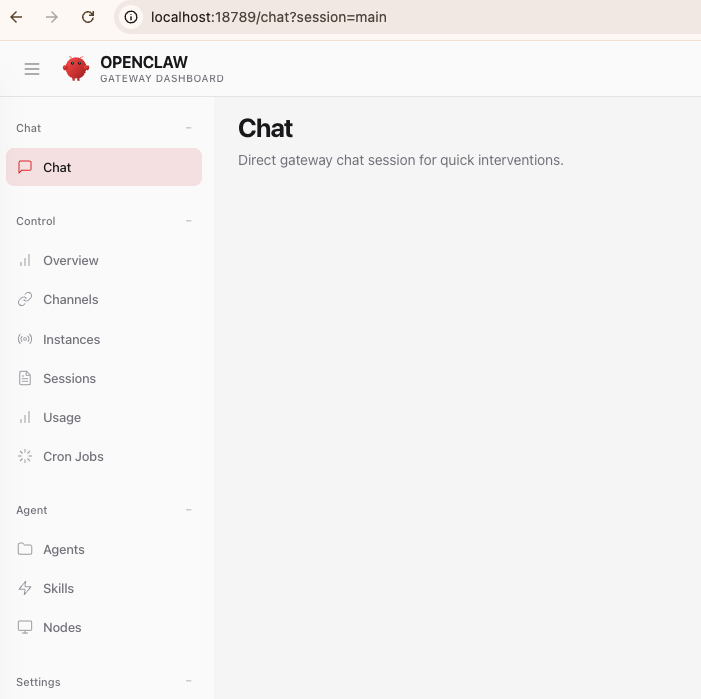
终端交互 (TUI - Terminal User Interface)
在 Linux 服务器中,可以直接使用 openclaw tui 在服务器本地或通过 SSH 直接与 Agent 聊天。
即时通讯软件 (Messaging Channels)
支持平台 : WhatsApp, Telegram, Discord, Slack, Signal, iMessage 等。
交互逻辑 :
- 在服务器上配置 Channel(如
openclaw channels login telegram)。 - 扫码或输入 Bot Token。
- 在手机端对机器人说话,它会自动调用后端 Gateway 处理并回传结果。
场景 : 移动办公。比如在 WhatsApp 发一句“帮我订明天下午两点的会议室”,它会自动操作你的日历。
自动化与调度 (Cron & Webhooks)
这是一种 非即时 的交互方式。
Cron : 你可以设置定时任务(
openclaw cron add ...),让 Agent 每天早上 8 点自动给你发一份“今日天气与邮件摘要”。Webhooks : 外部系统触发。例如 GitHub 有新的 PR 时,触发 OpenClaw 自动进行代码审计。
OpenClaw 常用配置
OpenClaw 主配置文件默认为 ~/.openclaw/openclaw.json
Gateway 配置
OpenClaw 通过 Gateway 控制 API 服务如何暴露、谁能访问、允许执行哪些设备命令。
{ |
修改默认 Model
cli 方式修改 :
openclaw config set agents.defaults.model.primary google/gemini-3-flash-preview
🦞 OpenClaw 2026.3.8 (3caab92) — I read logs so you can keep pretending you don't have to.
Config overwrite: /root/.openclaw/openclaw.json (sha256 e47a2fbf77c84c04dade91d8a5eb8afa95bdc06cd9dc6b85d6b35fc922c7799d -> 7645629694be7eb0eb6fac1157634033149bc442967e9d1f1dac73327e40bd83, backup=/root/.openclaw/openclaw.json.bak)
Updated agents.defaults.model.primary. Restart the gateway to apply.它会自动修改主配置文件
~/.openclaw/openclaw.json并在更改之前备份。修改后重启 Gateway 生效手动修改配置文件
~/.openclaw/openclaw.json {
"meta": {
"lastTouchedVersion": "2026.3.8",
"lastTouchedAt": "2026-03-11T08:55:06.020Z"
},
"agents": {
"defaults": {
"model": {
"primary": "google/gemini-3-flash-preview"
},
"workspace": "/root/.openclaw/workspace",
"compaction": {
"mode": "safeguard"
},
"maxConcurrent": 4,
"subagents": {
"maxConcurrent": 8
}
}
}
}
Channels 配置
要配置或修改 Channels 配置,可以使用 CLI 命令 openclaw configure ,根据提示配置即可。
Telegram
如果使用以下配置:
"channels": { |
"dmPolicy": "pairing"表示 Telegram 用户(非群组)和 OpenClaw 交互需要 Approve(Pairing),否则在 Telegram 中发送消息会失败。
未 Approve(Pairing)的用户,在 Telegram 中发送 /start 命令,OpenClaw 会返回如下信息,其他消息会报错: You are not authorized to use this command.
OpenClaw: access not configured. |
/start 命令会返回要在 OpenClaw 批准(Approve)的 Pairing Code:EA8DBU7E ,执行以下命令 Approve:
openclaw pairing approve telegram XXXXXX |
要查看有哪些等待批准(Approve)的 Pairing Code,执行以下命令
openclaw pairing list |
要查看目前有哪些用户可以和 OpenClaw 交互,可以查看以下文件:
cat .openclaw/credentials/telegram-default-allowFrom.json |
安全管控
在 OpenClaw AI 2026.3.8 中,Agent 默认是具备 文件读写、Shell 执行、网络访问等 能力 的。如果不做安全限制,可能会对系统造成不可逆的灾难后果。
在生成环境中,建议使用 Docker 运行 OpenClaw 。使其对宿主机文件系统只读,防止无意间修改线上环境。
目前 OpenClaw 默认配置中已经有 内置权限禁止部分危险操作 ,如果要限制其他命令,可以在 gateway.nodes.denyCommands 中添加即可。
{ |
使用 Docker 运行 OpenClaw
为了安全考虑,建议将 OpenClaw 运行在 Docker 容器中。
services: |
容器运行后,登录进容器中进行初始化配置。
常见错误总结
No API key found for provider “openai”
和 OpenClaw 交互报错:Agent failed before reply: No API key found for provider "openai". Auth store: /root/.openclaw/agents/main/agent/auth-profiles.json (agentDir: /root/.openclaw/agents/main/agent). Configure auth for this agent (openclaw agents add <id>) or copy auth-profiles.json from the main agentDir.
主配置文件 .openclaw/openclaw.json 如下
{ |
检查 Models 信息如下:
openclaw models |
问题原因 :
- 在
openclaw.json中指定了主模型为openai/gpt-5.4 - 系统根据
openai/这个前缀,尝试寻找一个名为openai的提供商的 API Key。 - 但是,
auth-profiles.json文件中只配置了名为openrouter的提供商及其 API Key。 - 同时,在
models.json的openrouter模型列表中,也 缺少 对openai/gpt-5.4这个模型的定义。
简而言之,系统被要求使用一个它不认识的模型,也找不到对应的钥匙。
要解决这个问题,我们需要在 openrouter 的模型列表( models.json )中,正式“注册” openai/gpt-5.4 这个模型。或者修改默认的模型,使用 openrouter 提供的模型。
不要手动修改
models.json,这个文件是由系统自动维护